
Quick Summary
Electronic proof of delivery (ePOD) is digital evidence that a delivery was made and accepted. A driver captures a signature, photos, and time stamps on a mobile device, and the record is stored electronically, so your team can see it straight away instead of waiting for paper to come back.
What Is Electronic Proof of Delivery?
Electronic proof of delivery, or ePOD, is the digital version of the signed delivery note. Instead of a printed slip, the driver uses a phone or tablet to record the delivery and who accepted the goods. The record is saved against the order and shared with the office.
You may also see the same idea called electronic POD, or digital proof of delivery. The wording changes, but the meaning does not: proof of delivery that is captured and stored electronically. [what is proof of delivery?]
ePOD vs Paper POD
| Paper POD | Electronic POD | |
|---|---|---|
| How it is captured | Handwritten signature on a printed note | E-signature, photos, and notes on a mobile device |
| Where the record lives | In the driver’s folder, then a file | Stored digitally against the order |
| Risk of loss or damage | Higher, because paper travels in vehicles | Lower, because it is stored digitally |
| Getting it to the office | When the paper comes back | As soon as the app syncs |
| Entering it in other systems | Typed in by hand | Can sync with an ERP |
| Evidence of condition | A written remark | Photos with time, date, and location stamps |
For a fuller comparison of costs and risks, read electronic proof of delivery vs paper POD. [Digital Delivery Receipts vs Paper Delivery Receipts: Which is Better]
What an ePOD Record Contains
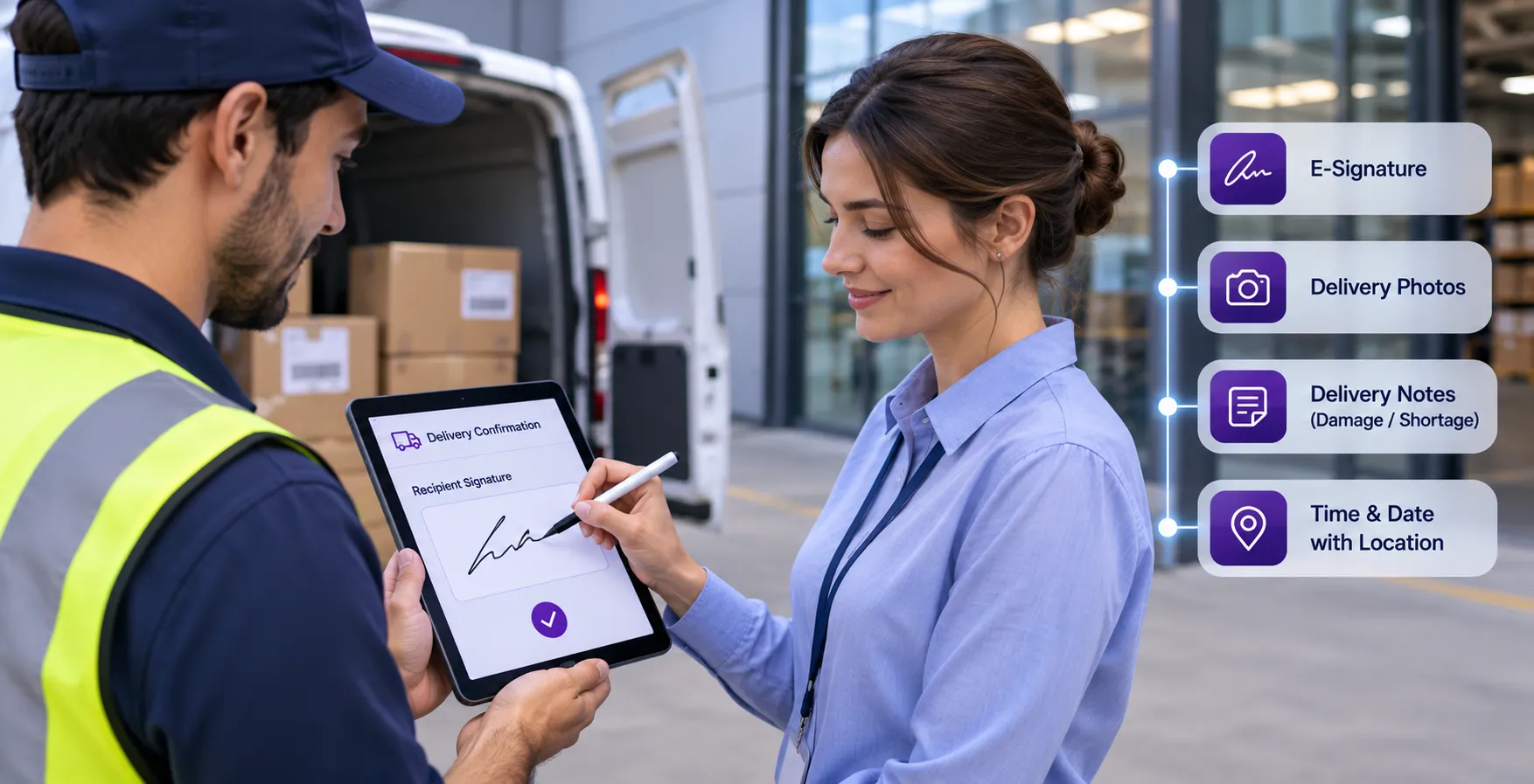
A typical electronic proof of delivery record includes:
- the recipient’s e-signature
- photos with time, date, and location stamps
- notes from the driver, such as damage or a short delivery
- an order or delivery reference
- the delivery status
Some systems record more. Check what your own system captures.
How ePOD Works in Four Steps
- A job is assigned. The delivery appears in the driver’s app, created in a portal or started from an order in your system.
- The driver delivers and captures proof. The driver collects the e-signature, takes photos, and adds notes. If there is no signal, the app keeps the data on the device.
- The record syncs. When the connection is available, the data goes to the central portal. Your team sees the proof and the delivery status.
- The data can move on. With an ERP connection, the proof can sync with your business system, so nobody has to type it in again.
For the full flow from order to confirmation, read our guide to how ePOD software works.
Benefits of ePOD
Fewer Lost or Unreadable Records
A digital record does not depend on a piece of paper surviving the trip back to the office.
Faster Confirmation
Proof is available when the delivery is completed, which helps billing and customer queries.
Clearer Evidence
A signature, photos, and notes together show who accepted the goods and what condition they were in.
Better Visibility
Dispatchers and managers can follow progress without phoning drivers.
Less Re-Keying
Drivers capture the proof once. With an ERP connection, the data does not need to be entered again.
Read more in our guide to the benefits of digital proof of delivery. [https://kpod.kaispe.com/insights/benefits]
Is Electronic Proof of Delivery Valid?
Acceptance of electronic proof of delivery depends on your country, your industry, and your customer contracts. Many businesses use e-signatures and photos as delivery evidence, but requirements differ, including how long records must be kept. Check the rules that apply to you with your legal or compliance team before you change your process. This article is general information and not legal advice.
Who Uses ePOD
Any business that delivers goods can use it. The KPoD website names retail and e-commerce, healthcare and pharmacy, and logistics and distribution as example industries. Construction and public sector teams also use proof of delivery for materials and supplies. In each case, the driver captures proof at the door, and the office uses it for tracking, billing, and customer service. Inside the business, drivers capture the proof, dispatchers and customer service look it up, finance uses it to support invoicing, and IT teams care about how it connects to the ERP. Each group gets something different from the same record.
A Simple Example
A retailer delivers an order to a customer’s home. The driver opens the job in the app, photographs the parcel at the door, and asks the customer to sign on the screen. There is no signal in the building, so the app keeps the data and syncs it later. Once the sync completes, the office sees the signature, photo, and time stamp, and customer service can answer questions about the order without calling the driver. This is an illustration, not a customer story.
Electronic Proof of Delivery With KPoD
KAISPE Proof of Delivery (KPoD) is an electronic proof of delivery solution with a mobile app for drivers and a management portal for your team. Drivers capture e-signatures, photos with time, date, and location stamps, and customer notes on Android or iOS, even offline. Your team monitors deliveries in real time and views proof records in the portal. KPoD offers optional integration with Microsoft Dynamics 365 Finance & Supply Chain Management and Business Central and can be customized for other ERP systems.
Common Concerns About ePOD
“What if there is no signal?” Good ePOD apps keep the data on the device and sync later. KPoD works this way.
“Will drivers use it?” Adoption depends on speed and simplicity. Start with a small group and listen to their feedback.
“Is it worth the cost?” Compare the real cost of paper: lost notes, chasing signatures, retyping, and handling delivery questions. KPoD has a free plan, so you can test it before you decide.
“Will it fit our systems?” Ask which ERP systems the solution supports and what data moves. KPoD offers optional ERP integration and API documentation.
How to Get Started With ePOD
- List what you need to capture. Signature, photos, notes, or all three.
- Pick a route or team for a pilot. A few weeks is usually enough to learn what works.
- Train drivers on the basics. Show them how to capture a signature, add photos, and write a short note.
- Review and expand. Check the records with operations and finance, then add more routes.
Conclusion
Electronic proof of delivery replaces slips of paper with a clear digital record made at the door. It helps your team find proof quickly, answer customer questions, and avoid retyping.
If you are weighing the switch, start by listing the problems paper causes today. Then try an ePOD solution on one route and see what changes.
FAQs
Electronic proof of delivery (ePOD) is digital evidence that a delivery was made and accepted. A driver captures the customer’s e-signature, photos, and notes on a mobile device, and the record is stored electronically where the office can see it.
ePOD stands for electronic proof of delivery. You may also see it called electronic POD or digital proof of delivery.
A delivery job is assigned to a driver, who completes the delivery in a mobile app and captures proof at the door. The record syncs to a central portal, even if the app was offline at the time, and can sync with your ERP.
It depends on your country, your industry and your customer contracts. Many businesses use electronic signatures and photos as delivery evidence, but you should check the requirements with your legal or compliance team.
Paper POD is a signed note that has to be carried back, filed, and often retyped. ePOD captures the same evidence on a device and stores it against the order, so it can be found and shared straight away.
The main benefits are fewer lost records, faster confirmation, clearer evidence, better visibility for the office, and less re-keying. Customers also get timely updates and confirmation.