
Quick Summary
How long a Business Central implementation takes depends on scope, data readiness, integrations, customization and how available your team is. There is no single answer, so this guide gives you a phase-by-phase view, the factors that speed a project up or slow it down and a sample timeline you can adapt for your own plan.
Timeline by Phase
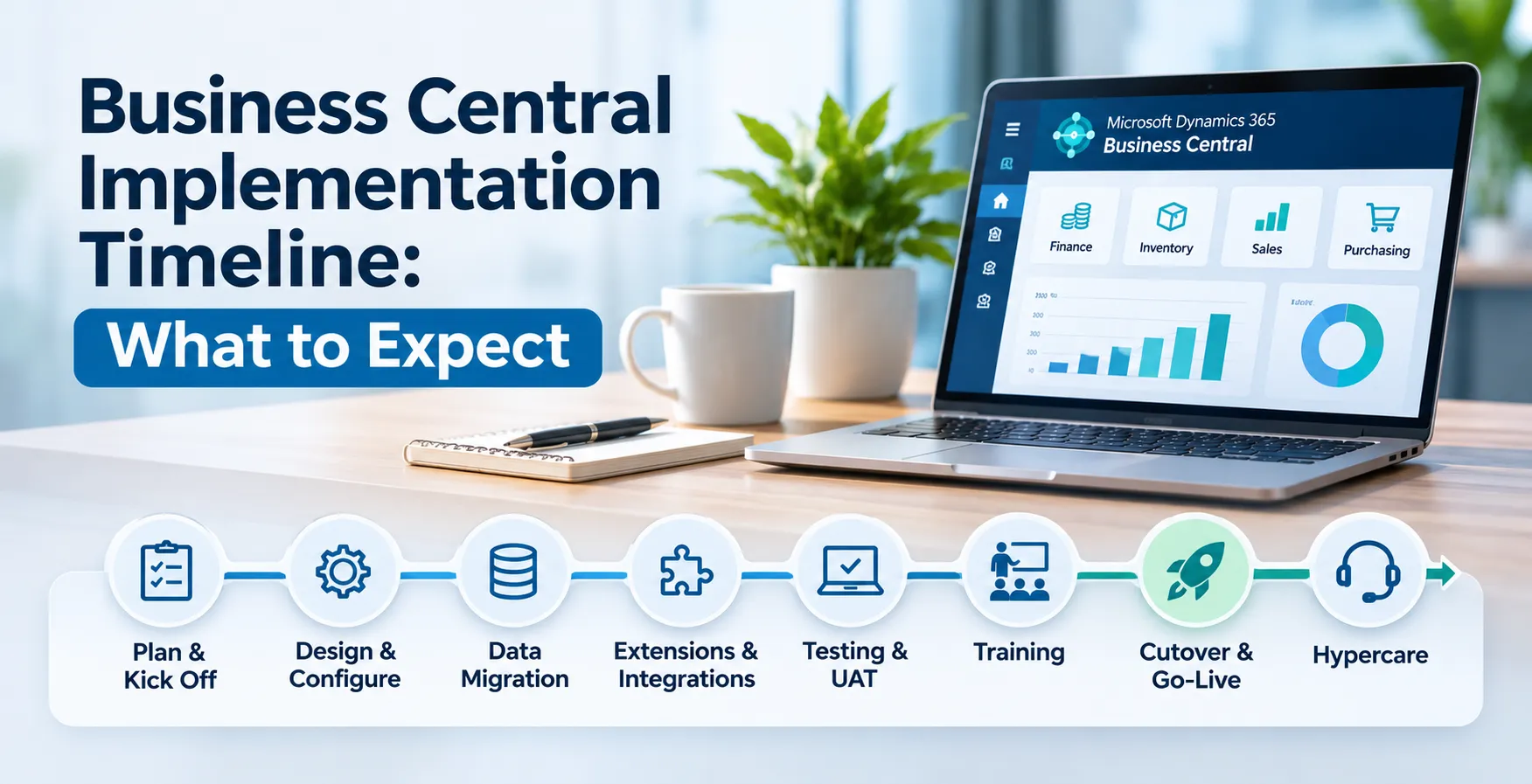
Most Business Central projects move through the same phases. The time each takes depends on your situation. [CONFIRM: add duration ranges only if KAISPE’s delivery lead approves them.]
1. Plan and Kick Off
The team agrees goals, scope, roles and a plan. The main output is a project plan and a clear scope document. Your involvement: name a sponsor and a project lead, and confirm decisions quickly.
2. Design and Configure
The partner maps your processes to Business Central, configures the system and agrees what, if anything, needs extending. The main output is a signed-off design and a configured system. Your involvement: process owners attend workshops and approve decisions.
3. Data Migration
Data is cleaned, mapped, loaded in rehearsals and reconciled. The main output is signed-off data in the system. Your involvement: data owners clean data and sign off results. Start this early.
For detailed guidance, use our Dynamics 365 data migration checklist
4. Extensions and Integrations
Any add-on apps, extensions and connections to other systems are built and tested. The main output is working, tested integrations. Your involvement: owners of connected systems take part in design and testing.
5. Testing and User Acceptance
The team tests processes end to end, then your users confirm that the system works for their jobs. The main output is a signed-off test result. Your involvement: business users run test scenarios and sign off.
6. Training
Users and super users learn the system with realistic scenarios. The main output is trained users with the right access. Your involvement: staff attend training and super users are ready to help colleagues.
7. Cutover and Go-Live
The final data load is run, the old system is frozen, and the new system is switched on. The main output is a live system. Your involvement: finance and operations confirm readiness and make the go or no-go decision.
8. Hypercare
The partner and your team support users and fix issues in the first weeks. The main output is a stable system and a handover to support. Your involvement: report issues quickly and agree when hypercare ends.
A Sample Timeline Table
Use this table as a template for your own plan.
| Phase | Main output | Client involvement | Typical duration |
|---|---|---|---|
| Plan and kickoff | Project plan and scope | Sponsor and project lead | [CONFIRM range] |
| Design and configure | Signed-off design and configured system | Process owners | [CONFIRM range] |
| Data migration | Reconciled data | Data owners and finance | [CONFIRM range] |
| Extensions and integrations | Tested interfaces and add-ons | System owners | [CONFIRM range] |
| Testing and UAT | Signed-off tests | Business users | [CONFIRM range] |
| Training | Trained users | All users | [CONFIRM range] |
| Cutover and go-live | Live system | Finance and operations | [CONFIRM range] |
| Hypercare | Stable system | All users | [CONFIRM range] |
Many phases overlap. For example, data cleansing starts early, and training is prepared while testing is under way.
What Speeds a Project Up
- A clear scope. The team knows what is in and what is out.
- Standard processes. Fewer customizations mean less to design, build and test.
- Clean data. Data that is ready early avoids rework.
- Fast decisions. A sponsor and process owners who answer within days.
- Available subject experts. People who can attend workshops and testing.
- A single project lead on your side who can make or escalate decisions.
What Slows It Down
- Late requirements. New needs appear after design is signed off.
- Data cleanup. Data work takes longer than planned.
- Customization. Each extension adds design, build and testing.
- Integrations. Systems are connected late, or their owners are not available.
- Thin testing. Defects found late cause delays.
- Busy staff. People are pulled back to daily work.
- Year-end or audit conflicts. Finance has no time to test or verify.
One Go-Live or a Phased Rollout?
Some companies switch everything on at once. Others go live in phases, for example finance first, then inventory and sales. A single go-live is simpler to explain and avoids running two systems for long, but it concentrates risk on one date. A phased rollout spreads effort and lets the team learn from the first phase, but it needs temporary connections between old and new processes. Decide which fits your business, and show the choice clearly in the plan, because it changes the timeline.
Choosing a Go-Live Date
A date that works for the plan may not work for finance. Think about:
- Period ends. Avoid going live in the middle of a close, a year-end or an audit where possible.
- Opening balances. Give finance time to load and verify them.
- Seasonal peaks. Avoid your busiest operational period.
- Training. Make sure training ends shortly before go-live, not weeks before.
- Parallel run. If you need extra assurance, run the old and new systems side by side for a short period, and agree how you will compare results.
- Fallback. Agree the rollback criteria and a backup date.
What Your Team Must Do Each Week
Even with a partner, your team has work to do. In general terms:
- Early weeks: agree scope, provide documents, name owners and attend workshops.
- Design weeks: review and approve designs, answer questions quickly.
- Data weeks: clean data, check mapping and reconcile results.
- Testing weeks: run test scenarios, log issues and sign off.
- Training weeks: attend training, support colleagues and prepare for cutover.
- Go-live weeks: check results, report issues and keep communication clear.
Ask your partner to estimate the time needed from your team for each phase, and plan for it. Shortage of internal time is one of the most common reasons for delay.
Can It Be Done in 30 Days?
Searchers often ask this. A very small, standard setup, with clean data, simple needs and a team that can give the project priority, may move quickly. Most projects take longer, because scope, data and integrations add work. If someone promises a short timeline, ask what is in and out of scope, how much time they expect from your team and what happens if data is not ready.
What Moves the Timeline Most
If you want to shorten the plan, work on the factors that move it most: reduce scope in the first phase, prepare data early, limit customization, name decision makers and protect your team’s time. Cutting testing and training is a false saving, because problems then surface after go-live.
Questions to Ask a Partner About the Timeline
- What phases do you propose, and what are the main outputs of each?
- What assumptions does the plan rely on?
- How much time do you need from our team each week?
- What are the usual causes of delay on projects like ours?
- How do you handle changes that affect the date?
- What is the plan if the data is not ready?
- What does hypercare include, and for how long?
For the cost side of the plan, see our guide to Business Central implementation cost.
Next Step
Planning a go-live date? Talk to our team about Business Central implementation services, and we can help turn your scope into a realistic plan.
Conclusion
A Business Central timeline is the sum of phases, each affected by scope, data, integrations and your team’s availability. The best plans name the factors that move the date and give the customer’s own tasks as much attention as the partner’s.
Start with a phase view, protect data, testing and training, and choose a go-live date that works for finance as well as for the project.
S
FAQs
It depends on scope, data readiness, integrations, customization and how available your team is. Ask any partner for a phase plan with assumptions, and be careful with a single number that ignores your data and your team’s time.
Typical phases are planning and kickoff, design and configuration, data migration, extensions and integrations, testing and user acceptance, training, cutover and go-live, and hypercare after go-live.
Some very small, standard setups with clean data and fast decisions can move quickly, but most projects take longer. A short timeline usually means a narrow scope, standard processes and a team that can give the project priority. Ask for the assumptions behind any short promise.
The most common causes are late or unclear requirements, data cleanup, customization, integrations that are added late, thin testing, slow decisions and busy staff. Year-end and audit periods also create conflicts.
Many companies avoid going live in the middle of a financial period close, at year-end or during an audit. Choose a date that gives finance time to close the old system and verify the new one, and plan a parallel run if you need extra assurance.
It depends on how much data you move, how clean it is and how many rehearsals you run. Start data cleansing early, because it often decides how quickly you can go live.