

Quick Summary
A Dynamics 365 implementation is the project that designs, configures, tests, and launches the system so your people can use it. Time and cost depend on scope, data, integrations, customization, the number of entities, and your team’s availability. This guide covers the phases, what moves the timeline, the cost drivers, the common risks, and when a partner helps.
Share with your team
- An implementation covers design, configuration, data, integrations, testing, training, and go-live, not only software setup.
- Microsoft’s Success by Design framework is a useful reference for phases and reviews.
- Scope, data, and customization drive most of the time and cost.
- Budget for training, internal time, and support after go-live.
- Name an engaged sponsor before the project starts.
What a Dynamics 365 Implementation Involves
Dynamics 365 is a family of business applications. The ERP side includes Finance, Supply Chain Management, and Business Central. The customer engagement side includes apps such as Sales and Customer Service. Your scope decides which apps, processes, entities, and countries are in the project.
Whatever the apps, an implementation includes the same kinds of work: understanding your processes, designing the solution, configuring it, moving data, connecting other systems, testing, training, and going live. Microsoft notes that its Dynamics 365 implementation guide is aimed at medium-sized and larger organizations and points smaller businesses to Business Central.
The Implementation Process, Phase by Phase
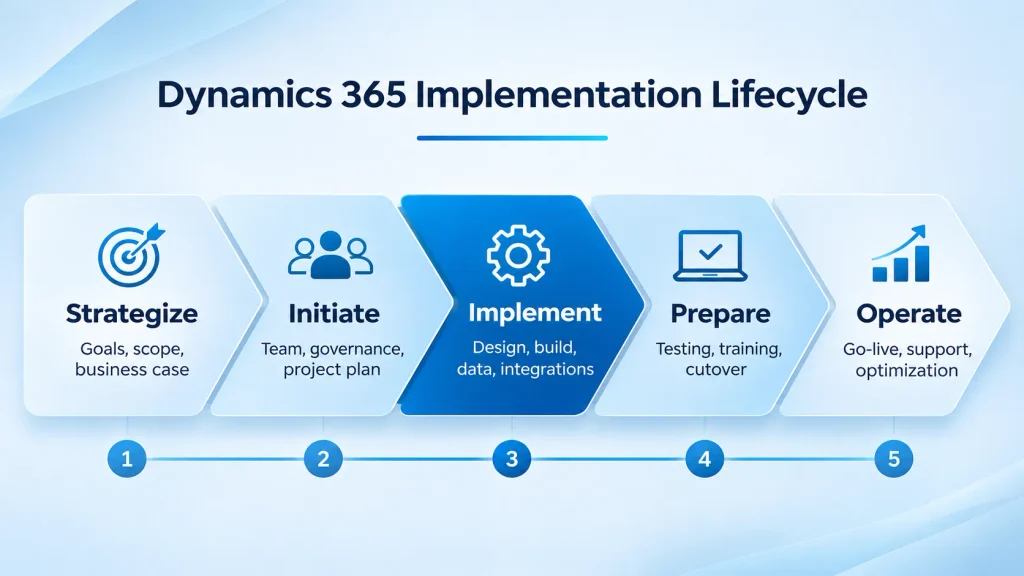
Microsoft Dynamics 365 implementation guide follows five stages of Success by Design.
Strategize
Define goals, scope, the business case, and the approach. Deliverables: scope statement, success measures, and governance.
Initiate
Plan the project, confirm requirements, and design the solution, using a process-focused approach. Deliverables: process maps, fit-gap results, and solution design.
Implement
Build and configure the solution, migrate data, and build integrations with regular reviews. Deliverables: configured system, tested interfaces, and migration rehearsals.
Prepare
Complete testing and user acceptance, train users, and plan the cutover. Deliverables: signed-off tests, trained users, and a rehearsed cutover plan. Use our Dynamics 365 implementation checklist to track this phase.
Operate
Go live, stabilize, and plan the next phase. Deliverables: a stable system, a support model, a backlog of improvements.
Timeline: What Moves It
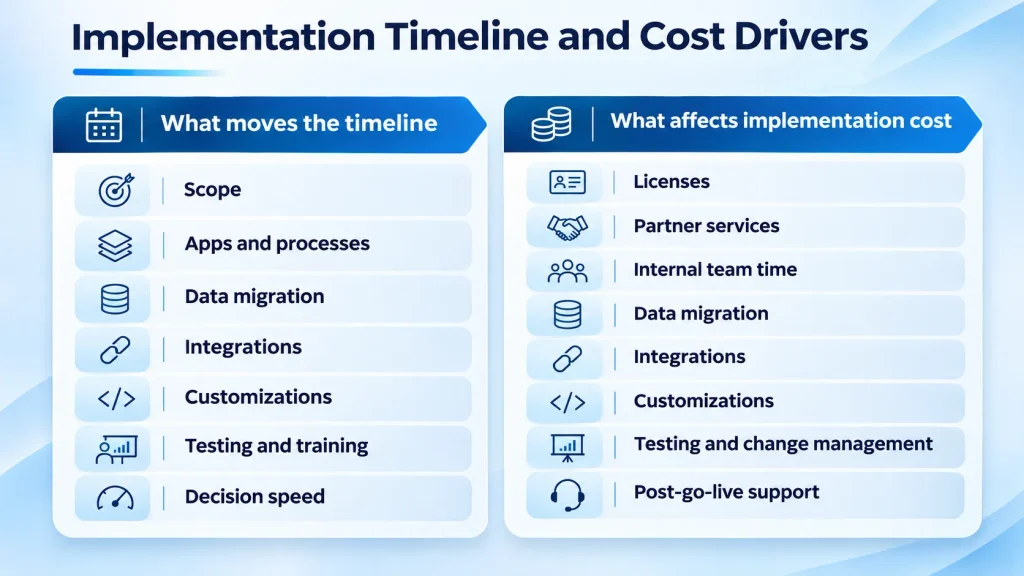
We do not give a single duration, because projects differ. These factors move the plan most:
- Scope: apps, processes, and countries
- Data volume and quality
- Number and complexity of integrations
- Customization
- Number of legal entities and languages
- How available your team is for decisions and testing
Ask a partner for a phase plan with its assumptions, and agree on what happens if one of them changes.
Cost Drivers
The partner’s quote is only part of the budget. Plan for:
- licenses
- partner services
- data migration
- integrations
- training
- internal staff time
- support after go-live
Quotes often leave out data cleansing, rehearsal loads, training for all roles, integrations, and post-go-live support. Ask each partner to list assumptions and exclusions in writing. See how to choose a Dynamics 365 partner and how to compare proposals.
Map Your Systems Before Design
List every system that must connect to Dynamics 365, the data that moves, the direction, the owner, and the volume before design starts. Late integrations are a common cause of delay. Read our Dynamics 365 integration best practices or talk to us about ERP integration services. If delivery or payable processes sit around your ERP, KPoD for proof of delivery and AutoAPX for accounts payable automation both connect to Dynamics 365.
Connect Dynamics 365 with Your Business Systems
Work with KAISPE to plan and implement integrations that support reliable data exchange across your business applications.
What Your Team Must Contribute
Even with a partner, your people carry part of the project. Process owners explain how work really happens and approve designs. Data owners decide what to bring over and sign off results. Finance and operations leaders test scenarios and accept the system. Super users learn early and help colleagues after go-live. Ask the partner to estimate the time needed from each group in each phase, and plan for it, because shortage of internal time is one of the most common causes of delay.
Governance: Keep Decisions Moving
Projects stall when decisions wait. Set up a steering group with clear decision rights, a RACI chart that says who is responsible and who is accountable, a risk register that is reviewed weekly, and a change control process for scope. Give the sponsor a short monthly summary: progress against the plan, risks that need a decision, and any change in scope. Governance should be light enough to use and firm enough to matter.
Data Migration at Summary Depth
Data is the workstream that most often surprises teams. Decide what to migrate and what to archive, clean data at the source, map fields, run several rehearsal loads, and reconcile balances before cutover. Assign a business owner for each data set, not only a technical one. Our data migration checklist takes you through each step.
Testing and Training: Protect Both
When the plan slips, testing and training are the first items to be squeezed and the last items you can afford to lose. Test in layers: configuration, end-to-end processes, integrations, data, security, and user acceptance owned by the business. Train by role with realistic scenarios and name super users early. Record test results and sign-offs as evidence. The process-focused approach in Microsoft’s guide ties testing and training to your end-to-end business processes, which keeps them practical.
Common Risks and How to Reduce Them
- Scope creep. Write the scope down and use change control.
- Poor data. Start early and rehearse loads. Use our data migration checklist.
- Over-customization. Configure first, extend second. See customization vs configuration.
- Weak sponsorship. Agree on decision rights and meeting rhythm.
- Thin testing. Protect time for business-owned acceptance.
- No change plan. Plan communication, training, and support.
Read more in common Dynamics 365 implementation mistakes. If you are unsure whether you need a new build or a move from an older system, see implementation vs migration.
Can You Implement Dynamics 365 Yourself?
A small, well-understood setup can be done in-house by a team with the right skills. A full ERP project is different: a partner brings method, experience, and capacity, while your team keeps ownership of decisions, data, and testing. Internal teams most often struggle with loose scope, copying old processes, late data work, and rushed training.
After Go-Live: Cloud-First and Copilot
Dynamics 365 is a cloud service, so updates arrive regularly. Plan who tests each release and who owns the backlog. Copilot features are an optional extra: review them after the core processes are stable, and check what applies to your apps on Microsoft Learn.
When to Bring in a Partner
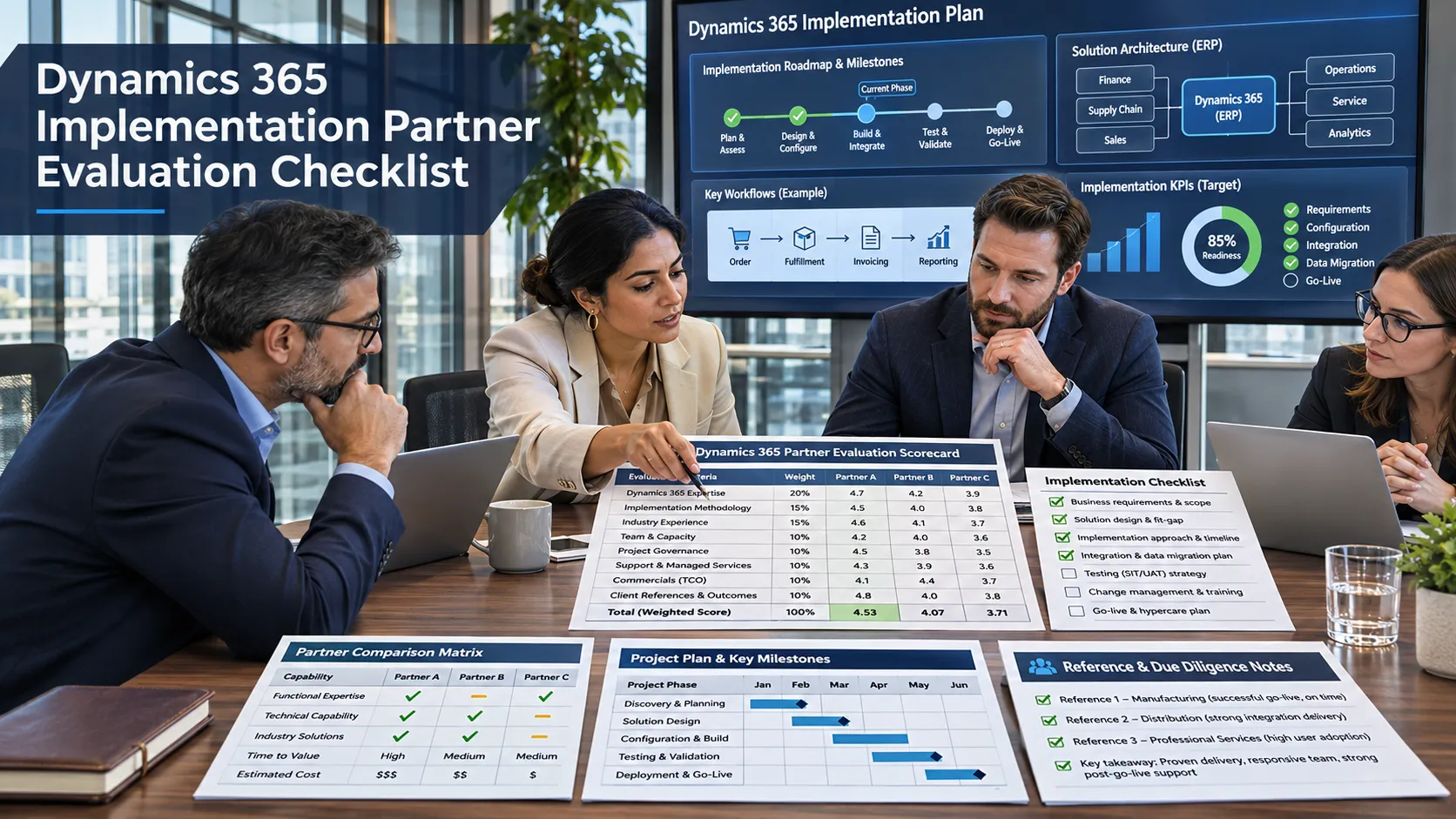
A partner helps most when the scope is large, integrations are complex, your team is new to Dynamics 365, or the date is fixed. Talk to us about Dynamics 365 implementation services, and use our partner evaluation checklist to compare options.
Planning a Dynamics 365 Implementation?
Work with KAISPE to define your scope, assess your requirements and plan your implementation.
Conclusion
A Dynamics 365 implementation succeeds when scope, data, and people are managed as carefully as the system. Use the phases as a plan, name the cost drivers early, and treat risks as a weekly agenda item.
FAQs
It depends on scope, data volume, integrations, customization, the number of entities and countries, and how much time your team can give. Ask any partner for a phase plan with assumptions, and be careful with a single number that ignores your data and your people.
Microsoft’s implementation guide follows five stages: strategize, initiate, implement, prepare, and operate. In practice, that means strategy and scope, design, build and migrate, test and train, go live, and support after go-live.
The cost depends on licenses, partner services, data migration, integrations, training, and your internal time and support after go-live. Compare quotes on what they include and exclude, not on one headline number.
Microsoft publishes the Success by Design framework, which maps the implementation lifecycle into phases and reviews. Partners usually combine it with their own methodology, so ask how they use it.
Common causes are unclear scope, weak sponsorship, heavy customization, poor data, thin testing, and little training. Technology is rarely the main reason.
A small, well-understood setup can be done in-house by a team with the right skills. For a full ERP project, most companies use a partner for method, experience, and capacity and keep ownership of decisions, data, and testing.